Zero-Downtime AI Agent Migration: Cloud to Home
The Problem
JARVIS has been running 24/7 in the cloud for months — answering questions, managing tasks, routing notifications. It’s become infrastructure. The kind of thing you notice when it’s gone.
Now I need to move it to local hardware. Not because the cloud version broke, but because I want lower latency, more control, and the ability to run models locally via Ollama. The constraint: zero downtime. JARVIS handles real-time Slack messages from multiple channels. If it goes offline for even a minute during the migration, messages get lost. There’s no replay buffer. Slack’s Event API is fire-and-forget.
The non-negotiables:
- Zero message loss during migration
- Memory continuity — the agent needs access to all historical context
- Transparent handover — users shouldn’t notice the switch
- Rollback capability — if home hardware fails, cloud must take over seamlessly
Why Not a Simple Cutover?
The naive approach: shut down cloud, spin up home, update DNS. But this breaks every requirement:
- Downtime window: Even a 30-second cutover means lost messages
- Memory gap: Cloud and home start with divergent state
- No rollback: If home hardware dies at 3am, cloud can’t resume without manual intervention
- Testing risk: Can’t validate home setup without going live
Instead, I need both systems running simultaneously during the transition, with intelligent routing and shared memory.
Architecture: Dual-Core JARVIS
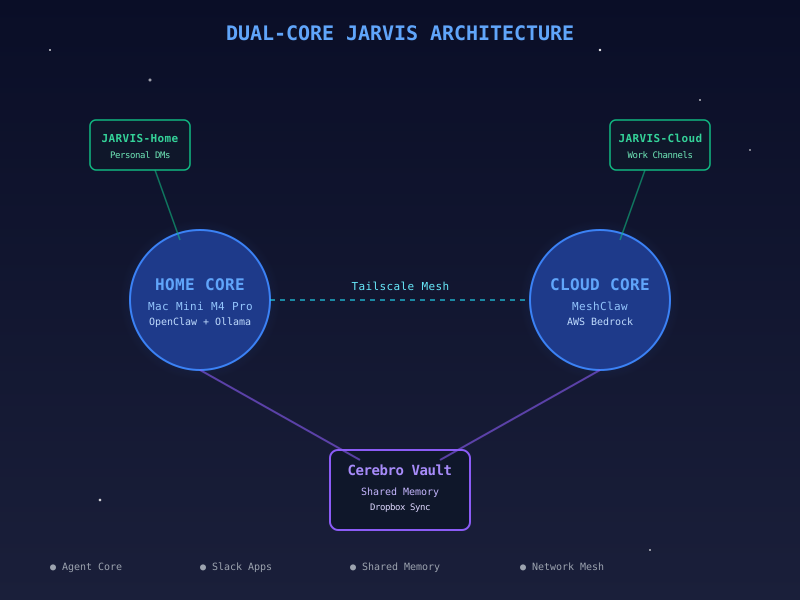
Dual-core architecture: Home and Cloud instances share memory via Dropbox-synced Cerebro vault
The solution: two independent JARVIS instances that share a single memory layer.
Home Core
- Hardware: Mac Mini with M4 Pro
- Runtime: OpenClaw (my local agent runtime)
- LLM: Ollama running
mistral-nemo:12bandllama3.3:70bfor fast local inference - Network: Connected to cloud via Tailscale mesh for secure tunnel
- Advantage: Sub-200ms response time, no API rate limits, runs private models
Cloud Core
- Hardware: Existing cloud VM
- Runtime: MeshClaw (distributed agent runtime)
- LLM: AWS Bedrock for access to Amazon-internal tools and knowledge
- Advantage: Already stable, integrated with work systems, fallback if home dies
Both cores run identical agent code. The only difference is infrastructure.
The Slack App Problem
Here’s where it gets tricky. JARVIS connects to Slack via Socket Mode — Slack pushes events over a WebSocket connection. The problem: Socket Mode round-robins events across all connected clients with the same app token.
If both Home and Cloud connect to the same Slack app:
- Message A goes to Home
- Message B goes to Cloud
- Neither agent has complete conversation context
- Users see split-brain responses
Solution: Two separate Slack apps.
- JARVIS-Home: New app token, connects only to Home Core
- JARVIS-Cloud: Existing app token, connects only to Cloud Core
This creates routing isolation — each app receives 100% of its events. The question becomes: how do we route messages to the right app?
Channel-Based Routing
The routing rule is simple:
IF (direct_message OR personal_channel):
    route → JARVIS-Home
ELSE:
    route → JARVIS-Cloud
Why this split?
- Personal channels and DMs: Low-latency responses matter, often casual queries, no need for Amazon-internal tools → Home wins
- Work channels: May require Bedrock models with access to internal knowledge, less latency-sensitive → Cloud wins
Implementation:
- Add JARVIS-Home to my personal workspace and DM channels
- Leave JARVIS-Cloud in work channels
- Gradually migrate work channels to Home once proven stable
The beauty: users control the routing. By choosing which app to @-mention or which channel to post in, they implicitly select Home or Cloud. No central routing service required.
Memory Architecture: Cerebro Vault
The hard part: both cores need access to the same memory — conversation history, task state, learned preferences, factual knowledge.
Traditional approaches:
- Shared database: Adds complexity, introduces latency, single point of failure
- Event bus: Requires real-time sync, network dependencies, out-of-order risk
- API layer: Centralized service that both cores call — defeats the point of distributed architecture
Better approach: Dropbox-synced filesystem.
I already have an Obsidian vault called Cerebro — my personal knowledge base, 200+ markdown notes synced across all devices via Dropbox. Obsidian is just a fancy text editor; the vault is a directory of .md files.
Key insight: Put agent memory inside the Cerebro vault.
~/Dropbox/cerebro/
├── conversations/
│   ├── 2026-05-03-project-planning.md
│   ├── 2026-05-04-code-review.md
├── tasks/
│   ├── active.md
│   ├── completed.md
├── knowledge/
│   ├── people.md
│   ├── projects.md
│   ├── preferences.md
└── agent-memory/
    ├── jarvis-state.json
    ├── context-cache.json
Both Home and Cloud mount the same Dropbox folder. Cerebro becomes the shared memory substrate. Dropbox handles:
- Conflict resolution (operational transform)
- Offline-first sync (optimistic updates)
- Multi-device consistency (CRDT-like behavior)
Benefits:
- No new infrastructure — leverages existing sync mechanism
- Filesystem semantics — both agents just read/write files
- Human-readable — I can inspect memory in Obsidian
- Automatic history — Dropbox keeps 30-day version history
Trade-offs:
- Eventual consistency — not real-time, ~1-2 second sync latency
- Conflict potential — if both agents write simultaneously, Dropbox may create conflicted copies
- Not transactional — no ACID guarantees
For JARVIS’s use case, eventual consistency is fine. Conversations are mostly sequential; parallel writes are rare. If a conflict occurs, both agents log the conflict and reconcile manually.
The Handover Protocol
Migration happens in four phases:
Phase 1: Shadow Mode (Days 1-7)
Home Core runs but doesn’t respond to Slack. It:
- Listens to events (via JARVIS-Home app)
- Processes messages
- Updates Cerebro memory
- Logs what it would have said
Cloud Core continues handling all responses.
Purpose: Validate that Home Core sees events correctly, memory sync works, no crashes.
Phase 2: Canary Routing (Days 8-14)
JARVIS-Home joins 2-3 low-traffic personal channels. Home Core starts responding there. Cloud Core still handles work channels.
Both cores update shared memory. We monitor for:
- Response quality (is Home as good as Cloud?)
- Memory consistency (do both see the same context?)
- Latency (is Home actually faster?)
Purpose: Smoke test with real users in controlled scope.
Phase 3: Progressive Migration (Days 15-30)
Add JARVIS-Home to additional channels, one per day. Users can explicitly @JARVIS-Home to force routing to Home Core, or @JARVIS-Cloud to stick with cloud.
Monitor for:
- Home Core stability (uptime, crash recovery)
- Memory divergence (if any)
- User feedback
Phase 4: Cloud Deprecation (Day 30+)
Once Home Core proves stable:
- Remove JARVIS-Cloud from all non-critical channels
- Keep Cloud running in read-only mode as warm standby
- If Home dies, manually re-add Cloud to channels (rollback plan)
- After 90 days of Home stability, decommission Cloud
Memory Sync Details
Each agent writes to Cerebro using append-only logs:
// agent-memory/jarvis-state.json
{
  "events": [
    {
      "timestamp": "2026-05-03T14:32:01Z",
      "agent": "home",
      "type": "message_received",
      "channel": "C123456",
      "user": "U789012",
      "text": "What's the status of PR #42?",
      "response": "PR #42 merged 2 hours ago."
    }
  ]
}
Reads are simple: each agent loads the full log and replays events to build current state. This is inefficient but correct — no cache invalidation bugs, no race conditions.
Optimization for later: snapshot + delta pattern (write full snapshot every 100 events, then deltas).
Conflict Resolution
If both agents write to jarvis-state.json simultaneously, Dropbox creates:
jarvis-state.jsonjarvis-state (Cloud's conflicted copy).json
Each agent runs a reconciliation job every 5 minutes:
- Check for conflicted copies
- Merge by timestamp (total order)
- Delete conflicted copies
- Log the merge event
Since events are timestamped and append-only, merging is deterministic.
Observability
Each agent reports health metrics to a shared status.json:
{
  "home": {
    "last_heartbeat": "2026-05-03T14:35:22Z",
    "uptime_seconds": 86400,
    "messages_handled": 347,
    "errors_24h": 2
  },
  "cloud": {
    "last_heartbeat": "2026-05-03T14:35:19Z",
    "uptime_seconds": 2419200,
    "messages_handled": 8932,
    "errors_24h": 0
  }
}
A monitoring script checks:
- Are both agents alive? (heartbeat within last 60s)
- Is memory sync working? (both agents see recent events)
- Are response times acceptable? (Home < 500ms, Cloud < 2s)
If Home Core goes down:
- Alert via Slack
- Manually re-add JARVIS-Cloud to affected channels
- Investigate Home Core failure
- Once fixed, resume migration
Why This Works
The key insights:
- Dual-core architecture avoids cutover risk — both systems run simultaneously, no big-bang migration
- Dropbox as shared memory layer — leverages existing infrastructure, no new services
- Channel-based routing — users control routing via app choice, no central router
- Append-only memory — simplifies conflict resolution, enables deterministic replay
- Progressive rollout — canary channels validate before full migration
Lessons Learned
What I’d do differently:
- Start with shadow mode earlier — ran cloud-only for months before considering migration, should have built dual-core from day one
- Structured logging from the start — had to retrofit event logs to enable memory sync
- Health checks before memory writes — early version had a bug where unhealthy agents still wrote to Cerebro, polluting shared state
- Version agent code carefully — Home and Cloud must stay in sync, otherwise memory schema diverges
Next Steps
After migration completes:
- Edge deployment — add a third core on a Raspberry Pi at a friend’s house, geographic redundancy
- Memory compaction — current append-only log grows unbounded, need periodic compaction
- Real-time sync — Dropbox is good but not real-time, consider syncthing or custom rsync
- Multi-agent coordination — extend pattern to other agents (EDITH for knowledge search, FRIDAY for automation)
Conclusion
Zero-downtime migration isn’t about cutting over cleanly — it’s about running two systems in parallel with shared state. By treating memory as a filesystem problem (not a database problem) and using Dropbox as a sync layer, I avoided building a distributed system from scratch.
The dual-core architecture isn’t just a migration strategy — it’s the new steady state. Home Core handles fast, local queries. Cloud Core provides fallback and access to work systems. Both share memory via Cerebro. If either fails, the other continues.
Infrastructure should be boring. JARVIS migrations should be invisible.
Now the hard part: proving it works.